The Jakovenko Group · AI for Law Firms
Free AI Tools / Built for Attorneys
Four tools to get your firm using Claude the right way — fast. Built from actual implementations across law firms, not theory.
Claude Cheat Sheet for Law Firms
For Law Firms
Everything your team needs to use Claude productively — on one page. Models, master prompt structure, 16 practice-area use cases, keyboard shortcuts, and the 30-minute daily workflow. Print it, post it, use it.
- —Claude model comparison (which to use when)
- —16 use cases across 4 practice areas
- —Master prompt formula for legal work
- —30-minute daily AI workflow
Attorney Voice Profile
100-Question Interview Prompt
One prompt you paste into Claude. It asks you 100 questions across 7 categories — beliefs, writing mechanics, aesthetic crimes, hard nos — then generates a permanent voice profile. Every document Claude writes for you after this sounds like you, not AI.
- —100 questions across 7 sections
- —Claude interviews you 3–5 at a time
- —Generates a permanent about-me.md profile
- —Takes 60–90 minutes, one session
Claude Master Playbook
For Law Firm Operations
The full 9-part reference guide for running a law firm on Claude. Setup through advanced use — intake, drafting, research, client communication, billing narratives, staff training, and security guardrails. Built from real client implementations.
- —9 modules from setup to advanced use
- —Intake, drafting, research, billing, HR
- —Security guardrails and PII handling
- —Team rollout and training framework
Staff Training Deck
13-Slide Team Presentation
Ready-to-run staff training for your whole firm. Covers what Claude actually is, model selection, Cowork setup, use cases by role, Skills, and shortcuts. Run it in 30 minutes with your team — no customization needed.
- —13 slides, fully designed
- —Use cases for partners, associates, paralegals, admins
- —Includes master prompt and about-me template
- —Ready to present out of the box
Attorney's Guide to Claude
20 Skills + CourtListener Research
Twenty skills for every stage of a matter — research, drafting, review, client management, and operations. Five of them connect directly to CourtListener's database of real court opinions. No prompt rewriting every session. Install once, use every case.
- —20 skills across 5 practice categories
- —5 research skills powered by CourtListener (free, real case law)
- —Covers drafting, review, client work, operations, and risk assessment
- —No hallucinated citations — real opinions, real courts
Estate Planning Prompt Pack
12 Claude prompts for estate planning attorneys
Intake calls, drafting, document analysis, and billing — one dark-design one-pager built for estate planning practice. Built on Ruben Hassid's master prompt framework with confidentiality guardrails on every prompt.
Personal Injury Prompt Pack
12 Claude prompts for PI attorneys
Intake, drafting, medical records analysis, and litigation billing — one page, 4 sections, built for personal injury practice.
Immigration Prompt Pack
12 Claude prompts for immigration attorneys
Intake, drafting, document analysis, and strategy — built for immigration practice with confidentiality guardrails and Hassid-framework prompts throughout.
Family Law Prompt Pack
12 Claude prompts for family law attorneys
Intake, drafting, document analysis, and billing — built for family law practice. Same dark one-pager design, same Hassid framework.
Attorney LinkedIn Content Toolkit
10 Claude prompts for attorney-written posts
5 post types — case wins, contrarian takes, legal education, firm milestones, and news reactions. Anti-AI word checklist included. Works with your voice profile. Confidentiality guardrails built into every prompt.
52-Week Claude Prompt Calendar
One practical Claude prompt per week, all year
52 prompts across 8 themes — client communication, drafting, marketing, operations, strategy, research, advanced AI integration, and year-end planning. Text file, no formatting required, works in any Claude session.
Law Firm Cash Pulse
AI financial command center for law firms
Daily cash position, AR aging, AI inbox triage, 30/60/90-day cash forecast, and a weekly AI-generated partner briefing — all in one dashboard. Built on Base44 with Claude powering the backend.
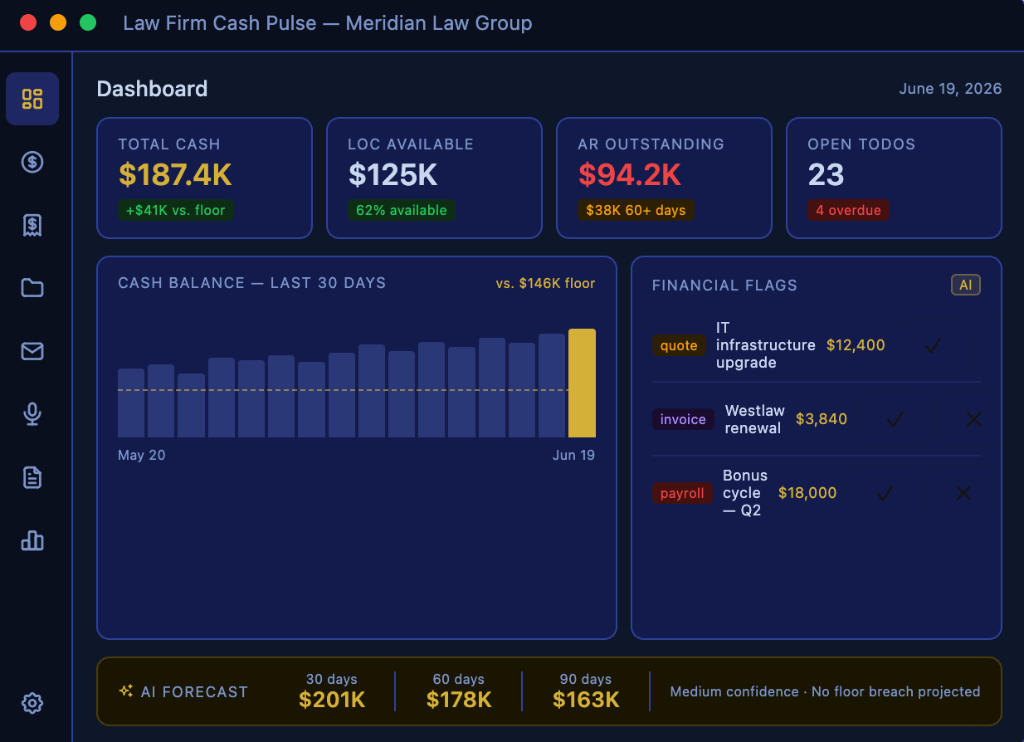
- —Real-time cash position across all accounts with floor-breach alerts
- —AI email triage — every inbound email auto-extracts todos, financial flags, and project notes
- —Collections nudge generator — one click drafts a follow-up email and call script for any outstanding invoice
- —30/60/90-day cash flow forecast generated from live transaction and AR data
- —AI weekly partner briefing delivered every Friday — cash position, watch list, AR priorities, focus item
- —Benchmark Q&A — upload comp surveys and ask natural language questions
Law Firm GEO Audit Checklist
25 checks to find out if AI can find your firm
GEO (Generative Engine Optimization) is why some firms show up when someone asks ChatGPT or Perplexity for an attorney recommendation — and others don't. This checklist covers the technical, structural, and platform signals that determine whether AI surfaces your firm. Most of the problems it finds have nothing to do with content.
- —Checks for the noindex flag — the single most common reason firms are invisible to AI
- —Schema markup audit across LegalService, Attorney, Organization, and FAQPage types
- —Credential entity structure — bar year, certifications, and practice areas in AI-readable format
- —Content structure review: H1 tags, practice area pages, author attribution
- —AI platform presence: Google Business Profile, Avvo, Martindale, Justia
- —Score your firm 0–25 and know exactly where to start
All tools download instantly. No email required.
John Jakovenko
From a recent LinkedIn post
I spent too much on AI tools this year.
Most of it was wasted.
Here's what actually survived — the stack I'd rebuild from scratch tomorrow.
Granola
AI Notetaker
Best AI notetaker I've used. No bot joins your call. Nobody on the other end sees "recording." Integrates directly with Claude. The phone app is just as good as desktop.
Wispr Flow
Talk-to-Text
Talk-to-text for PC and phone. Not close. I dictate most of my client work now instead of typing it.
Anything
App Builder
App builder. Ideas to working tools without a developer.
Ranked
DIY SEO
DIY SEO. If you're paying an agency $3K/month for basic SEO, look at this first.
But here's the one thing I'd tell you to do before any of it:
Build your voice profile in Claude first.
It takes about two hours. Nobody wants to do it. Everyone skips it. Do it anyway. Because the difference between AI that sounds like a robot and AI that sounds like you is the difference between a tool you abandon in three weeks and a tool you can't work without.
Two hours. Once. Then Claude writes like you for the rest of your career.
My AI cheatsheets for attorneys are here — free:
Get the Free Cheatsheets(Some links above are referral links. I only share tools I actually pay for and use.)
How It Works
01
Get the cheat sheet
Print it and put it next to your screen. Your team has a reference for every common use case on day one.
02
Run your voice interview
Paste the prompt into Claude, answer 100 questions honestly. Save your profile. Every document Claude writes after this sounds like you.
03
Build your firm's workflow
Run the staff training deck with your team in 30 minutes, then use the playbook to roll out Claude across intake, drafting, research, and billing.
Questions
Do I need a paid Claude subscription?
For the cheat sheet and playbook, Claude.ai free works. For the voice profile interview, Claude Pro or Opus 4 gives significantly better output — the interview is long and the free tier may time out.
How long does the voice profile take?
60 to 90 minutes for the full 100 questions. You can split across two sessions if needed.
Can I share these with my team?
Yes. The cheat sheet and playbook are designed to be shared. Each attorney should do their own voice profile — the output is specific to each person.
Are these actually free?
Yes. No email capture, no upsell sequence. Request the tools, get them. If you want hands-on AI implementation for your firm, that's where we work together.
Want Hands-On Implementation?
The tools are free. / The implementation is not.
Getting AI into a law firm that actually uses it — consistent prompts, staff buy-in, integrated into real workflows — is a different engagement. I work fractionally with a small number of firms at a time.